Where?
1. Find a neighborhood
that's right for you |
|
Useful online resources
- Zillow.com
lets you explore estimated property values in different
neighborhoods.
- Go to
GreatSchools.net
for information about the quality of local schools.
-
City-data.com has discussion forums about cities and
neighborhoods. Type a city and state into the
search box, and you'll often be rewarded with local
gossip about different neighborhoods.
-
McCormacks provides lots of useful information about
different California cities.
-
Neighboroo.com has color-coded maps that let you see
how neighboring zip codes rank in terms of home prices,
school quality, foreclosure risk, and so forth.
-
BestPlaces.net profiles 3,000 cities, and includes
information about crime, climate, cost of living, and
schools. Be sure to check out the site's
Find Your Best
Place calculator.
- Homefair.com provides
school reports and
city profiles.
- CNNMoney compiles an annual list of
the
Best Places to Live and
Best Places to Retire.
-
Epodunk.com has profiles of 46,000 cities, including
smaller towns.
- Forbes compiles an annual list of the
Best Cities for Singles.
-
FindYourSpot.com
will also try to match you with a city that's right for
you.
-
Scorecard.org measures pollution in different areas.
Some tips
- The three most important words in
real estate are, of course, "location, location,
location."
- It's usually better to buy the
cheapest house in a neighborhood than the most expensive
house in a neighborhood.
- A trick for finding the best
neighborhoods in a city is to type in the city's name at
Realtor.com, look at the most expensive
listings, and note their zip codes.
|
|
 |
|
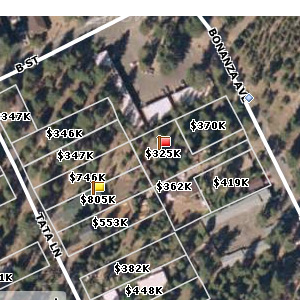
Zillow.com
provides "Zestimates"--rough appraisals
of properties values--for millions of homes.
By typing in a city or zip code, you can
pull up a map that will let you see how
property values vary by neighborhood.
But don't put too much faith in the
Zestimates--they can be wildly inaccurate. |
|
|
|
|
 |
|
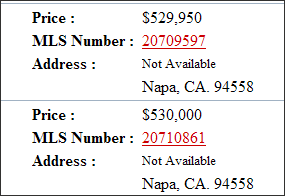
About 25% of the
MLS listings in Sonoma, Marin, and Napa Counties don't show the home
address. (The practice of suppressing addresses is
rare in other counties.) This can be frustrating to buyers
who want to search online for homes.
While it's "safe"
to get a property address over the phone, be aware that some
agents set traps for buyers who call them. For
example, if an agent were to get your name and give you the
combination for a
lockbox on the property, he or she might be able to
claim the buyer's agent's commission if you later buy the
house.
Call us at (707)
481-1776 if a property address isn't visible--we'd be happy
to look it up for you.
|
|
|
|
|
2.
Search online for a home
|
You'll find
the largest number of homes for sale on the Multiple Listing
Service (MLS).
Realtor.com is a good
starting point for exploring the MLS, but local MLS websites usually have more information. Here's
where to find them:
Sonoma, Napa, Marin, Mendocino, and
Solano Counties: Search at
GreatHomes.org.
Contra Costa and Alameda Counties:
Search at
BayEast.org.
San Francisco County: Search at
SFARMLS.com.
Sacramento, El Dorado, Placer, Merced,
San Joaquin, Yolo, or Stanislaus Counties: Search
at
MetrolistMLS.com.
Santa Clara and San Mateo counties:
Search at
MLSListings.com.
Write down the
MLS numbers of any homes that interest you, and send it to us at
info@sixhomes.com.
We'll fax or mail you more detailed information about the
homes. (Please limit your request to 15 homes at any
time.)
After you get the
information sheets, drive by these
homes and explore their neighborhoods. Talk to
neighbors, but not to owners or agents. Narrow your
list to six or fewer homes, then
call us at (707) 481-1776. We'll arrange to have a
field agent meet with you and personally show you each of
the homes.
|

|
 |